
From Clicks to Outcomes: Engineering Reliable Computer-Use Agents
The architecture of browser automation that knows when work is actually done
This research informs the hands-on architecture and implementation work Cognilode delivers for engineering teams.
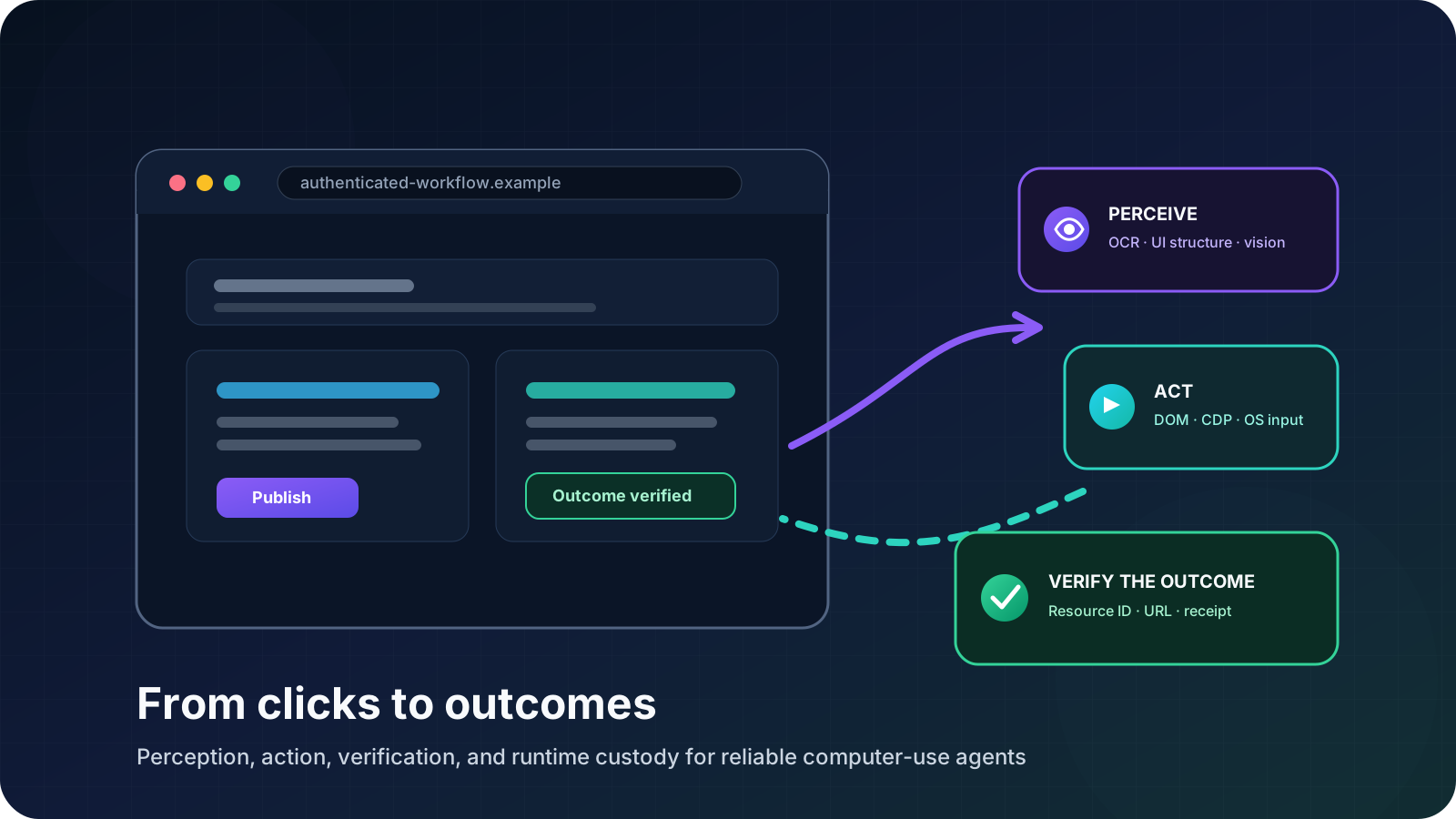
A cursor moves across the screen. A button is clicked. A form changes. A progress indicator appears.
It looks impressive because the motion is visible. But visible motion is not the same thing as completed work.
For a computer-use agent, a click is only an input event. The real engineering problem is everything that must surround that event:
- preserving the correct authenticated identity;
- understanding the current page state;
- selecting the most dependable interaction surface;
- keeping screenshots, coordinates, and viewport geometry aligned;
- waiting for the interface to settle;
- verifying that the intended state transition occurred;
- reading back the resulting business object or confirmation;
- and delivering a durable result that another system can trust.
We have implemented and used computer-use infrastructure across authenticated media publishing, dashboard inspection, document upload, dynamic forms, and multi-step submission workflows. That experience led us to a simple conclusion:
Reliable computer use is a closed-loop control problem, not a sequence of clicks.
The system must repeatedly observe, interpret, act, verify, and decide whether the real-world objective has been achieved. Once that loop is taken seriously, browser automation stops looking like a clever demo and starts looking like production infrastructure.
A Successful Click Is Not a Successful Business Action
A useful computer-use architecture distinguishes three levels of success.
1. Command success
The input event was issued. A mouse click, keypress, file attachment, or navigation command returned without an execution error.
2. Interface success
The application visibly entered the intended state. A dialog opened, a new page loaded, a form field changed, or a publish flow advanced.
3. Business success
The durable external result can be identified and used. A resource has a canonical ID and URL. An application has a submission confirmation. A message has a delivery receipt. A dashboard value has been converted into a structured metric tied to its source capture.
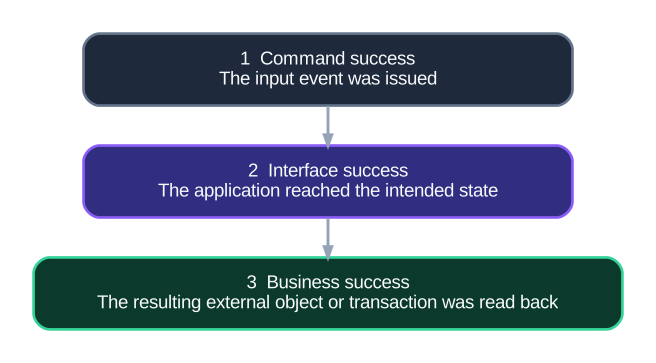
This distinction changes system design. If command success is enough, the agent can simply issue actions and count them. If business success is required, the architecture needs state observation, domain-specific verification, identity continuity, and a completion record.
That is a much higher bar—and a much more valuable system.
The Closed Loop: Observe, Interpret, Act, Verify, Read Back
The most dependable computer-use systems do not plan a long blind macro and hope the interface behaves as expected. They operate in a bounded loop.

Each stage has a distinct responsibility.
Observation captures the screen and any structured state available from the browser or operating system.
Interpretation turns raw pixels into a compact model of the current interface: visible text, candidate controls, layout, page identity, and task-relevant state.
Action selection chooses one meaningful operation, such as opening a page, selecting a control, attaching a document, or confirming a choice.
Execution realizes that operation through the most dependable available mechanism.
Verification checks what changed after the action rather than assuming that the action produced its intended effect.
Outcome readback looks for the external result that matters to the surrounding workflow.
This is a control loop in the classical engineering sense. The agent acts on an observed state, measures the result, and corrects its next decision using feedback.
Perception Should Be Layered, Not Monolithic
A screenshot contains a tremendous amount of information, but it is not always efficient to ask one large multimodal model to interpret every pixel on every step.
We found it more useful to treat perception as a layered system.
OCR for exact visible language
Optical character recognition is excellent for labels, headings, status messages, field values, and confirmation text. It is inexpensive relative to full visual reasoning and can often provide the exact words needed to select or verify an action.
UI parsing for layout and candidate controls
A UI parser can identify likely buttons, text regions, form controls, and bounding boxes. This gives the planner a compact spatial representation rather than forcing it to infer the entire interface from a raw image.
Multimodal reasoning for ambiguity
A multimodal model is most valuable when the screen contains genuine ambiguity: an icon without accessible text, a complex visual arrangement, a canvas, a dynamic editor, or several plausible targets that require task-level interpretation.
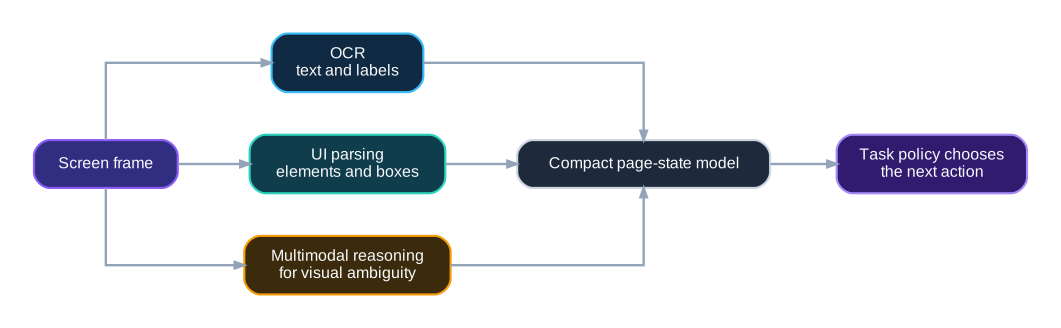
The planner should own the task decision. Perception helpers should supply usable facts rather than independently deciding what the business workflow means.
Capture fidelity is part of intelligence
Visual reasoning is only as good as the frame presented to it. We have worked through practical details that materially affect OCR and coordinate accuracy:
- converting raw RGB buffers into valid PNG images;
- handling padded row strides correctly;
- retaining true-color, eight-bit-per-channel captures;
- keeping screenshot size, browser viewport, and display geometry consistent;
- preserving image dimensions in parsed UI results;
- distinguishing normalized coordinates from pixel coordinates.
These details may look low-level, but they determine whether an agent perceives the correct interface and clicks the intended location. In computer-use systems, geometry is part of the reasoning contract.
Visual Agents Should Not Be Pixel-Purists
A common misconception is that a computer-use agent must perform every operation through human-like mouse and keyboard input.
That is rarely the best production architecture.
The system should preserve one semantic task state while selecting the most deterministic maintained surface available for each step.
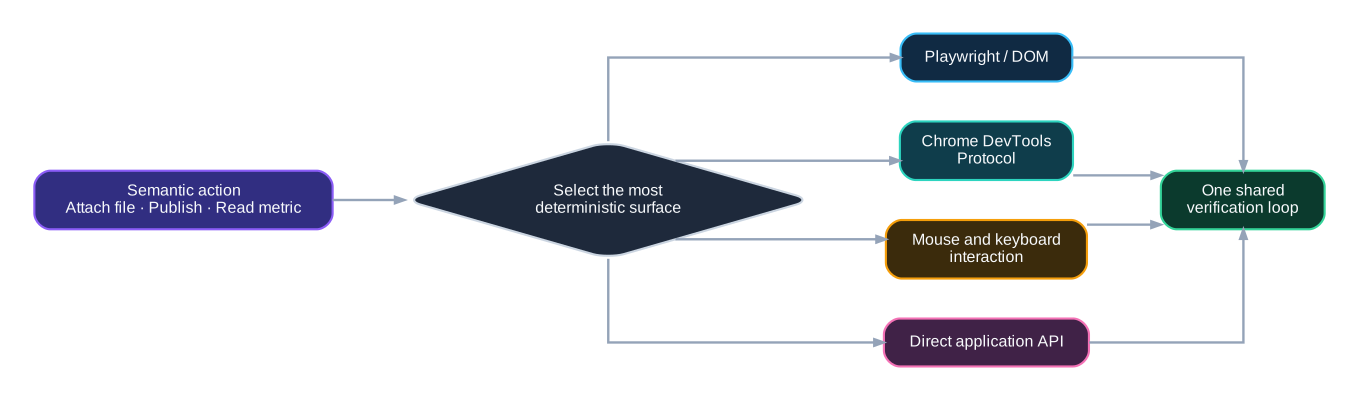
Consider file upload. From the task’s perspective, the action is simple: attach this document to the active workflow.
The runtime may complete that action through a visible native file chooser. In another interface, it may connect to the already managed Chrome session through the Chrome DevTools Protocol and use Playwright’s maintained set_input_files operation. Both are implementations of the same semantic action.
This hybrid approach has several advantages:
- visual reasoning remains available where page interpretation is genuinely ambiguous;
- deterministic browser primitives are used where the page exposes stable structure;
- the system avoids unnecessary coordinate fragility;
- all actions remain inside one task trace and one completion model;
- verification does not depend on which surface performed the action.
The governing principle is:
Use vision for ambiguity and deterministic primitives for structure.
A production computer-use agent should be surface-flexible, not ideology-driven.
Browser Identity Is Runtime State
Authenticated automation is often described as a cookie problem. In practice, it is a runtime-custody problem.
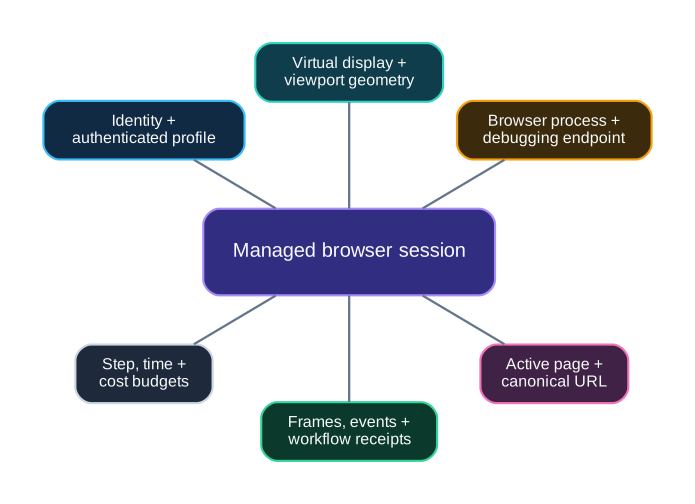
A reliable browser session includes more than credentials:
- a run identity;
- an authenticated profile or browser context;
- a virtual display;
- viewport dimensions;
- a browser process;
- a debugging endpoint;
- the active page and current URL;
- a screenshot and event sequence;
- file and download roots;
- a cleanup boundary.
Authenticated profiles and cookie normalization
Persistent profiles are useful for long-running authenticated workflows, while isolated runtime copies or dedicated profiles help separate concurrent work.
Cookie import also requires more care than it first appears. Different exporters may encode expiry in Unix seconds, milliseconds, microseconds, nanoseconds, or Chrome’s Windows-epoch representation. A browser runtime should normalize those values before loading them, retain secure and HTTP-only attributes, and verify that each cookie domain belongs to the active task scope.
Service readiness is not process start
Launching Chrome does not mean its debugging interface is ready. We treat browser-process creation and CDP readiness as separate states. The runtime polls the endpoint, records the selected port, and only exposes the session after the control surface is actually reachable.
Dynamic displays and debugging ports
Concurrent browser workers should not assume they can all own the same Xvfb display or debugging port. We have used bounded allocation of free virtual-display identifiers and Chrome debugging ports, checking existing X11 locks, sockets, and local port availability before launch.
This turns concurrent browser work into a managed resource problem rather than a collection of shell-script assumptions.
Verify the Transition, Not the Intention
After an action, modern web interfaces may animate, debounce, upload, navigate, reflow, or update asynchronously. A fixed sleep is a weak substitute for state observation.
A stronger approach repeatedly observes the interface until it becomes stable enough to interpret. The runtime can then compare the pre-action and post-action captures, inspect text and UI structure, and decide whether another observation is needed.
The verification layer can combine several signals:
- visual delta between before and after frames;
- disappearance or appearance of a target element;
- OCR of a new confirmation string;
- URL or route transition;
- changed form or control state;
- a new external object identifier;
- a structured browser or API response.
Early in our work, we required an action to be followed by a corroborating observation. That principle later expanded into state stabilization, visual change measurement, and domain-specific outcome readback.
Outcome readback should be narrow and authoritative
The final completion signal should come from the narrowest trustworthy source available.
For a publishing workflow, that may be the created resource’s canonical ID and public URL. For a form submission, it may be a visible success page and a recorded submission entry. For a sent message, it may be a transport receipt. For a dashboard metric, it may be the displayed number, source URL, screenshot, OCR provider, and confidence.
Broad page text is convenient, but it can contain unrelated identifiers and stale content. Domain-specific readback is more dependable.
A structured outcome receipt might look like this:
{
  "status": "complete",
  "operation": "publish_media",
  "resource_type": "video",
  "resource_id": "external-resource-id",
  "canonical_url": "https://example.com/resource/...",
  "final_page": "https://example.com/studio/...",
  "verification": {
    "method": "resource_readback",
    "screen_stable": true,
    "corroborating_signals": 3
  },
  "artifacts": {
    "final_capture": "capture-final.png",
    "event_trace": "events.jsonl"
  }
}
The receipt is not merely for debugging. It is the handoff between browser activity and the larger business system.
Proportional Controls for External Actions
Computer-use agents cross the boundary between internal reasoning and external state. The right controls depend on the impact and reversibility of the action.
Reading a public page should not require the same friction as sending a customer message, publishing content, submitting an application, or changing a canonical account profile.
A practical control ladder looks like this:
observe
→ warn
→ pace or budget
→ require explicit intent
→ scope identity and credentials
→ require approval for selected high-impact actions
→ execute
→ verify
→ record a receipt

The key is proportionality.
Low-impact, reversible navigation can move quickly. Paid visual planning may need a budget and step cap. Authenticated workflows need scoped identity and session custody. High-impact external mutations may need explicit delegated authority or confirmation. Every meaningful action benefits from outcome verification and a durable record.
The goal is not to surround every click with ceremony. The goal is to give the system enough freedom to act productively while preserving the information needed to understand, verify, and continue the work.
Positive Use Cases We Have Operated
The architecture above was shaped by real workflows rather than isolated click benchmarks.
Authenticated media publishing
We used managed browser sessions and CDP-assisted browser actions to publish media through an authenticated web interface. The workflow handled file attachment, metadata entry, audience selection, optional thumbnail upload, and progression through the publishing interface.
Completion was based on the resulting public resource identity and canonical URL—not on the final button press.
Structured metric extraction
We converted visible dashboard values into typed operational records. The output retained the metric name, unit, normalized value, source URL, capture artifact, OCR provider, displayed text, and confidence.
This is an important pattern for systems that must interact with web applications lacking a convenient data API: visual information can become structured data without discarding its provenance.
Multi-step submission workflows
We used managed browser and CDP-assisted execution for real multi-step submissions involving authenticated sessions, dynamic forms, document upload, and downstream operational records.
The runtime tied the session to the correct applicant identity and document set, maintained the browser state across the workflow, and connected completion to a separate business ledger.
One semantic file-attachment action
The operator-facing action remained “attach this file.” The runtime selected a native file chooser or a maintained browser primitive according to the active interface.
That separation kept the task contract stable while allowing the implementation to choose the most dependable route.
Reusable task profiles
We packaged recurring workflows into profiles that carried domain scope, provider preference, authenticated browser state, viewport, runtime bounds, capture policy, and completion rules.
Profiles turned generic browser capabilities into reproducible operational workflows.
End-to-end content operations
Computer use also operated inside a broader autonomous media pipeline that assembled assets, created video and thumbnail outputs, prepared metadata, published through an authenticated interface, and read back visible results.
This broader context matters. Browser interaction created value because it was connected to upstream production and downstream measurement—not because the browser moved by itself.
Design Principles for Reliable Computer Use
The implementation history suggests several durable principles.
1. Start with typed actions and explicit scope
Actions, domains, providers, step limits, runtime limits, and identity should be represented directly. A planner should not invent the execution boundary from prose on every step.
2. Keep perception and task policy separate
OCR, UI parsing, and multimodal vision should describe the page. The task layer should decide what matters and what action advances the objective.
3. Preserve coordinate and image geometry
Screenshot dimensions, viewport size, UI boxes, and action coordinates must describe the same visual world.
4. Use the most deterministic surface available
Pixels, DOM selectors, CDP, operating-system input, and direct APIs can coexist. The correct surface is the one that completes the current step reliably while preserving one task state.
5. Treat the browser as a managed runtime
Identity, process, display, profile, port, page, files, events, and cleanup belong to the architecture.
6. Re-observe after meaningful actions
Interactive pages change. Prefer one-action feedback loops over long blind macros unless the workflow is demonstrably deterministic.
7. Make completion domain-specific
A generic “success” flag is weaker than a created resource ID, public URL, confirmed submission, sent-message receipt, or structured metric.
8. Produce a durable handoff
The result should be usable by another system: status, resulting object, key fields, final capture, actions, duration, cost, and follow-up obligations.
9. Scale control with impact and reversibility
Fast local observation and tightly controlled external mutation can exist in the same system. Friction should match the action.
From Browser Automation to Autonomous Operations
Computer-use agents are often introduced as a way to automate applications that do not expose an API. That is useful, but it understates their broader role.
A mature computer-use layer becomes the bridge between autonomous reasoning and the large part of the digital world that still lives behind graphical interfaces.
To serve that role well, the system must do more than generate inputs. It must maintain identity, choose among visual and structured interaction surfaces, verify state transitions, read back domain outcomes, and hand the result to the next operational system.
That is the difference between a browser agent that performs motions and an autonomous system that completes work.
The difficult part of computer use is not generating a click. It is preserving identity, selecting the right interaction surface, verifying the transition, and connecting the final state to the business process that made the action worthwhile.
At Cognilode, we design and implement the infrastructure around autonomous systems: multimodal perception, managed browser runtimes, action layers, workflow orchestration, verification, memory, evaluation, and business-system integration.
When an automation project has moved beyond a demo—and the result must be dependable enough to operate inside a real organization—the browser loop should be treated as core systems architecture.
Make browser-agent workflows dependable enough for real operations.
Cognilode can harden identity custody, perception, action routing, stabilization, verification, outcome readback, and receipts across your highest-value browser workflows.
Related engineering notes

The Control Plane Outside the Agent
A practical architecture for operating autonomous AI systems with independent process custody, semantic health, runtime isolation, calibrated controls, and coherent rollback.
Read article →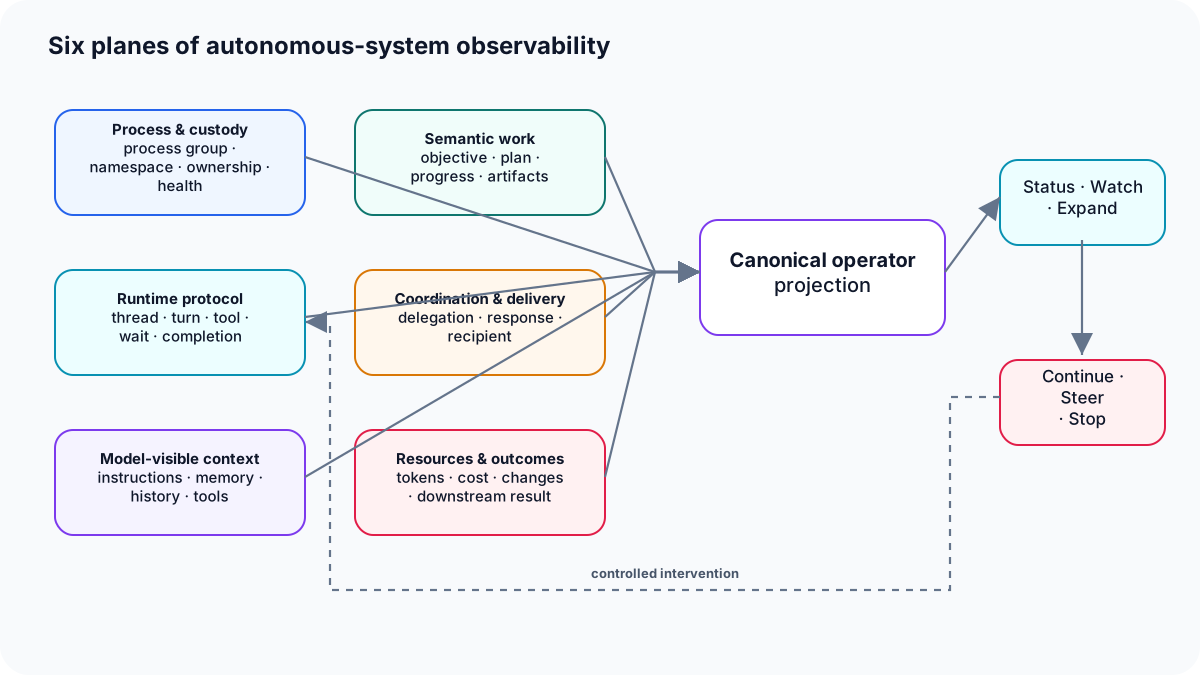
Why Agent Traces Are Not Enough
A practical architecture for observing what autonomous systems saw, decided, delegated, spent, changed, and delivered—not merely which API calls completed.
Read article →